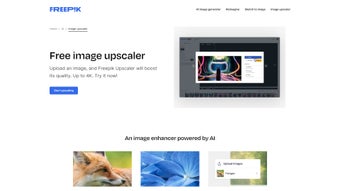

Download Freepik Upscaler – Free AI Image Upscaling Tool, 4K Output, Batch Processing
Overview
Freepik Upscaler is a cloud‑based, AI‑driven image enhancement platform that transforms low‑resolution pictures into crisp, high‑definition assets up to 4K resolution. Designed for a broad audience that includes graphic designers, photographers, marketers, and casual users, the service focuses on preserving fine details, sharpening edges, and reconstructing textures that are typically lost during compression or age. What truly differentiates Freepik Upscaler from generic upscalers is its batch‑processing engine: users can upload dozens of files in a single session, apply consistent enhancement settings, and retrieve all results with one click.
The entire workflow runs inside a modern web browser, meaning there is no need for a heavyweight desktop client, GPU, or specialized hardware. The interface guides you through three intuitive steps—upload, adjust, and download—while offering imagination levels and style presets (3D, artistic, portrait) that let the AI adapt to the context of each image. Supported formats include JPG, JPEG, WEBP, and PNG, ensuring seamless integration with existing asset libraries.
Because processing occurs on Freepik’s secure servers, updates are automatic and you always benefit from the latest AI models without manual patches. In short, Freepik Upscaler delivers professional‑grade upscaling that is both accessible and powerful, making high‑resolution output a reality for any project without cost or complex setup.
Key Features and Real‑World Benefits
Freepik Upscaler combines cutting‑edge machine learning with a clean, user‑friendly design to solve the most common challenges of image enlargement. The AI engine analyses each pixel, predicts missing details, and reconstructs textures that look natural rather than artificially stretched. Below is a comprehensive list of the capabilities that set this tool apart, followed by an explanation of how they translate into tangible benefits for both professionals and hobbyists.
- 4K Output Resolution: Scale images up to 3840 × 2160 px while maintaining color fidelity and fine detail.
- Batch Processing: Enhance up to 20 images simultaneously in the free tier; larger batches are available with premium plans.
- Style Presets: Choose from 3D, artistic, or portrait modes to tailor the AI’s approach to specific content types.
- Imagination Levels: Adjust enhancement intensity from subtle sharpening to dramatic texture recreation.
- Broad Format Support: Works with JPG, JPEG, WEBP, and PNG, preserving the original file type unless you specify otherwise.
- Browser‑Based Interface: No installation required; runs on any modern Windows, macOS, Linux, Android, or iOS device with a recent Chrome, Edge, Firefox, or Safari browser.
- Secure Cloud Processing: Files are encrypted via HTTPS during upload and automatically deleted after 24 hours.
- Free Core Service with Optional Premium Add‑Ons: Unlimited single‑image upscales are free; premium plans unlock higher priority queues and larger batch sizes.
These features deliver concrete advantages: designers enjoy consistent quality across brand assets, marketers can quickly upscale campaign visuals, and families can revive treasured photos without learning complex software. Batch mode reduces project turnaround from hours to minutes, while style presets provide creative control without the need for external editing tools. The secure, cloud‑first architecture ensures that you always work with the latest AI model, and because the service runs entirely in the browser, system requirements are minimal—any device that can browse the web can benefit. Altogether, Freepik Upscaler offers a professional workflow that feels effortless, affordable, and safe.
Installation, Compatibility, and Step‑by‑Step Usage Guide
Freepik Upscaler eliminates the traditional installation hurdle by operating as a fully web‑based service. This design choice makes the tool compatible with virtually every operating system. The Windows, macOS, Linux, Android, and iOS platforms are supported as long as you run a recent version of Chrome, Edge, Firefox, Safari, or any Chromium‑based browser. Below is a detailed walkthrough that covers account setup (optional), image preparation, enhancement configuration, and result retrieval.
Step‑by‑Step Workflow
- Open the Platform: Navigate to Freepik Upscaler. The landing page loads instantly, and no plug‑ins or downloads are required.
- Create (or Skip) an Account: While you can upscale a handful of images without signing in, registering provides batch limits, history tracking, and access to premium features.
- Upload Your Files: Drag‑and‑drop images into the upload zone or click “Select Files.” The free tier accepts up to 20 images per batch; premium users can upload larger groups.
- Configure Settings: Choose the desired output resolution (up to 4K), select a style preset, and set the imagination level. A real‑time preview shows a thumbnail of the AI‑enhanced result.
- Start the Enhancement: Click “Enhance.” The AI processes each image in the cloud; typical processing time is 2‑5 seconds per standard image and 8‑12 seconds per 4K image.
- Download Results: When processing finishes, you can download individual files or click “Download All” to receive a zip archive. Original files remain untouched on your device.
Because all heavy computation occurs on Freepik’s servers, your local hardware only handles the upload and download, making the tool ideal for low‑end laptops, tablets, and even smartphones. Security is baked in: every transfer uses HTTPS encryption, and files are automatically purged from the server after 24 hours, complying with GDPR standards. If you encounter any hiccups, the built‑in help center offers troubleshooting tips, and premium members enjoy live chat support. This frictionless, cross‑platform workflow ensures that anyone—from a freelance designer on a MacBook to a student using an Android phone—can quickly upscale images without compromising privacy or performance.
Pros, Cons, Frequently Asked Questions, and Final Verdict
Pros & Cons
- Pros:
- Free core functionality with true 4K output.
- Batch processing saves valuable time on large projects.
- No installation required; works on any modern browser.
- Style presets and imagination levels provide creative flexibility.
- Secure, encrypted cloud processing with automatic file deletion.
- Cons:
- Free tier limits batch size and queue priority.
- Internet connection is mandatory; offline use is not possible.
- Advanced features such as larger batch limits are locked behind a paid plan.
Frequently Asked Questions
Is Freepik Upscaler truly free?
Yes. The basic version allows unlimited single‑image upscales and limited batch processing at no cost. Premium subscriptions are optional for faster queues and larger batch capacities.
Which file formats does the tool support?
Freepik Upscaler accepts JPG, JPEG, WEBP, and PNG files. The output retains the original format unless you specify a different one during download.
Can I use Freepik Upscaler on mobile devices?
Absolutely. The web interface is fully responsive, allowing you to upload, enhance, and download images directly from Android or iOS browsers.
How does the AI avoid creating visual artifacts?
The model has been trained on millions of high‑resolution photographs, learning natural texture patterns and edge behavior. It uses contextual analysis to fill missing pixels, which greatly reduces the risk of halos, streaks, or other artificial artifacts.
Is my data safe during the upscaling process?
All uploads are encrypted via HTTPS, and files are automatically removed from Freepik’s servers after 24 hours. The service complies with GDPR and other privacy regulations to protect user data.
Conclusion & Call to Action
Freepik Upscaler stands out as a versatile, free AI‑driven solution that delivers genuine 4K results, batch processing, and creative style controls without requiring any installation. While the free tier imposes reasonable limits on batch size and queue priority, those constraints can be lifted with an affordable premium upgrade. Security, cross‑platform compatibility, and an intuitive workflow make it a trustworthy addition to any designer’s toolkit or hobbyist’s photo‑revival arsenal. If you’re ready to turn blurry assets into razor‑sharp visuals, simply visit the Freepik Upscaler page, upload your images, and experience AI‑enhanced resolution instantly. For larger projects or faster processing, consider the premium plan—a modest investment that yields a noticeable boost in productivity and output quality.
Pros: Free core service, true 4K output, batch processing, style presets, secure cloud handling.
Cons: Free tier batch limits, requires internet connection, premium features locked behind a subscription.



.png)



